I Built a Fully Automated YouTube Video System With Claude, n8n, and HeyGen
A step-by-step look at an automated video pipeline that turns a Telegram message into a published YouTube video using Claude, n8n, and HeyGen.

Right now, I don't make any videos myself. If I want to create a video, I simply open Telegram and type a message there. That's it. Then in a while, I'll get a script and I'll approve the script. If I don't like the script, I'll say, "Change the script," and the system will change the script. Then I'll approve it. After approving it, a video will show up on my Telegram message and also on my YouTube channel as unlisted. Then I can review that video and publish it. That's it. The whole system is automated.
You can record one take of yourself talking and never touch an editing timeline again. There's a free GitHub repo that turns Claude Code into your video editor. Film yourself and it does the rest. It transcribes your footage, cuts your mistakes, and rebuilds the video around your best takes. Instead of screen recording your app, it generates clean UI mockups timed to your voice, then cleans up your audio automatically. You record once, Claude Code edits, packages, and can even post it.
Why I Built This Automation System

I built this entire system using different tools, but mainly Claude, n8n, HeyGen, and VidIQ. To be honest, I did not sleep last night while building this. I was awake until 5:00 a.m. So this is something I built, and I'm going to show you everything, step by step, in this video.
Let's first talk about the problem. Every creator has this problem. My biggest problem was not getting the ideas, it was basically managing the time. You have to write the script, you have to record the video, so many things you need to do alone. That's why I used to miss consistency. I could not consistently publish videos. That's why I was thinking of something that could automate this. Because of this problem, I built this. Now I don't have to put my time into creating short videos. That's why I built this automation system, and now, from my idea, it turns into a video and runs on its own, everything, even with my face and my voice.
How the System Works: Four n8n Workflows
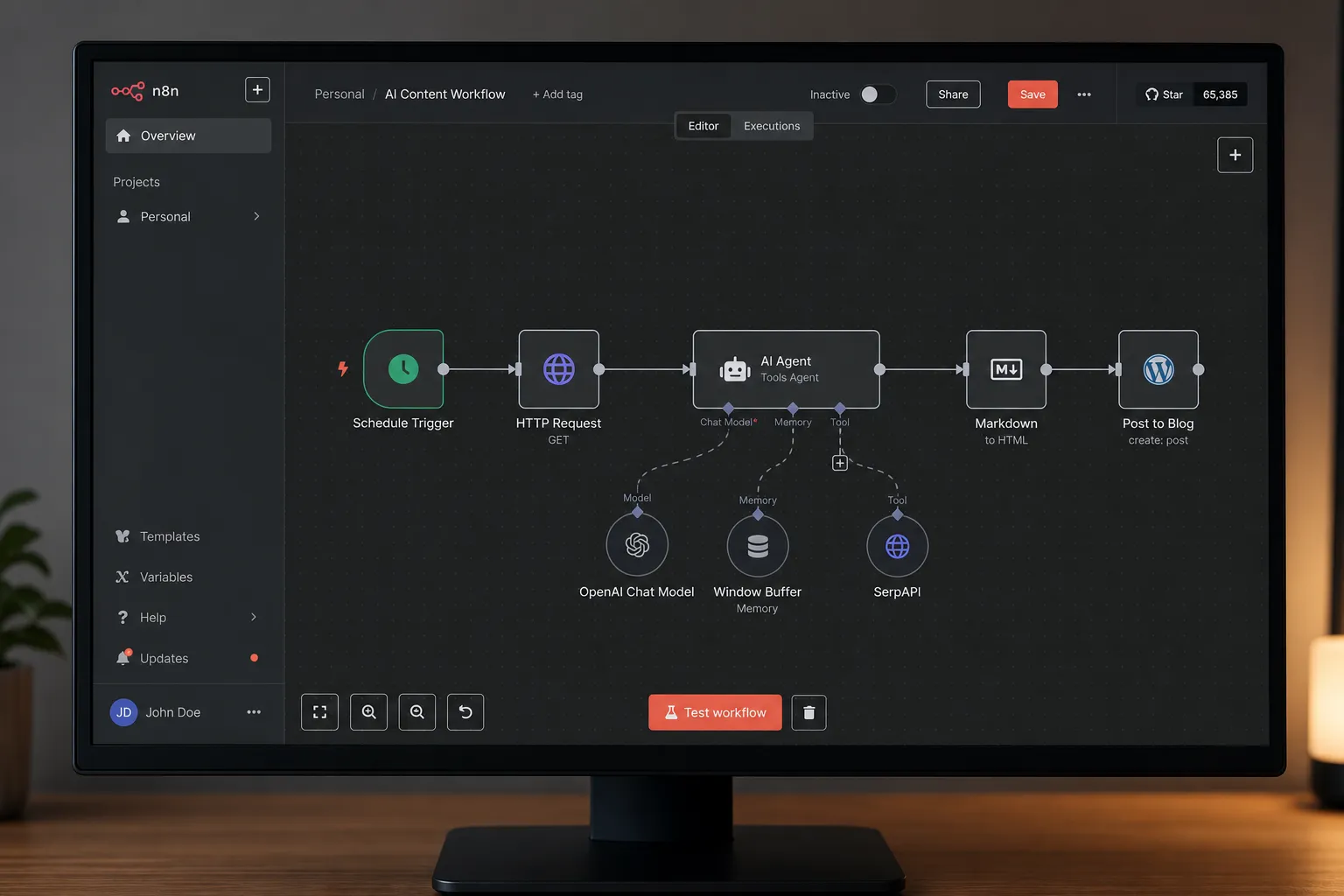
Let me give you a quick overview of the system before we start executing. First, understand how the system is actually built. We have four workflows on n8n.
Workflow 1: Idea Intake via Telegram
Workflow one is the idea intake via Telegram. It takes the idea from Telegram and sends it to Claude.
Workflow 2: Script Review and the Claude Code Routine
Workflow two reviews the script. Claude sends the script and waits for approval. Once it is approved, it goes to production. Or if I ask for changes, it goes back to Claude for revision. When the revised version is approved, it comes back to Telegram and notifies me, then sends instructions to HeyGen. Once I confirm production, Claude automatically sends this to HeyGen.
Before the third workflow, let me show you the Claude runtime. When you push the idea from step one, it comes to Claude, I mean the Claude Code routine. I have created one routine here, which is connected to our GitHub repo. In that GitHub repo, we have skills and reference scripts, so Claude can read from there. Claude takes all its instructions from the skill file given there, every instruction: how the video should be created, how the process should go, which workflow to use. Everything is there.
The reason I used GitHub to store the skill file and references is that I can edit it using different AI agents like Codex, Gemini CLI, or whatever. We trigger this Claude routine via an API trigger. In this workflow, we've added n8n, VidIQ, and HeyGen as connectors. We've made multiple executions here, all API-enabled triggers. Claude is responsible for the entire system we built. All workflows follow its instructions.
Workflow 3: Logging Everything to the Spreadsheet
With the third workflow, we log everything into the spreadsheet. Claude appends the details to the spreadsheet whenever it gets an update, like the title, the description, the approved title, the description. And also the video ID. It gets the video ID from HeyGen, because it's already been sent to production. So Claude takes the video ID from HeyGen, the title, and the description, and appends it to the spreadsheet.
Workflow 4: Waiting for HeyGen and Publishing the Video
Then we have the fourth workflow, which waits for HeyGen to actually deliver the video. We've registered an n8n webhook inside HeyGen, and through this webhook, HeyGen reports back to n8n once the video is created, once it is successful. It goes to the spreadsheet, finds the row, gets the video ID, and in the same row, adds the downloadable video link. Then it downloads the video and uploads it to YouTube. Then it sends a message on Telegram that the video is uploaded, here is the link, and it is unlisted.
That's how the system works. We're using a smooth workflow here, and whenever there's an error, that also gets reported to me. That's the whole system behind this.
Step-by-Step Demo: From Telegram Message to Finished Video

Now let's get started step by step. I'll show you the demo of how it works. First, I give it a topic on Telegram. Along with the topic, I write the angle and the CTA, which is optional, but you can keep it. Just after the topic, in a bracket, I add "use VidIQ" or "no VidIQ." This tells Claude whether to use VidIQ or not, because I don't want to waste unnecessary credits on VidIQ. Then I send the message.
Within seconds, I get a message back that the topic has been sent to Claude, and Claude will send the script for review in a while. After a while, it reaches Claude. Claude creates the script and sends it. I open the link, and the link opens a form, which contains the title, keywords, description, whether it has any revision or not, the CTA, and finally the script.
I review the script, that's the most important part. If I don't like something, I mark it as "request changes" instead of "approve," and I write the feedback in the box, whatever I liked and what I don't like. If I simply like the script, I just select "approve" and send it back to Claude. If I give feedback and ask for a change, it goes back to Claude, and it comes back with a new script in the same way. I can even ask for revision again if I want.
Now, if I approve it, it moves to the next step, and I get notified via Telegram that it has been sent to production, to HeyGen. Once Claude instructs HeyGen, HeyGen starts creating the video with the video agent, the same kind of AI avatar video generation approach other tools use. Inside HeyGen, I can also see if the video agent has started creating the video or not. I can see a new video has been added, the process is going on, everything I can see. It can take a couple of minutes to prepare the video.
When the video is ready, it sends a webhook to n8n, and I get a notification on Telegram that the video is created, or if there's an error, it will also send that. The moment I get it, the video has been created, I get the link to the video. It's unlisted on YouTube, so I go to YouTube and check the video there. I review the video, and I may publish it.
The Real Cost and Honest Disclaimer
One thing to be honest: this did not work for me the first time. There were so many errors, so many things, and I had to redo it again and again. I needed to try multiple times, and a lot of credit was wasted from each platform, just because I was doing this to solve the problem and get one finished video out. Now, that is finally what I've achieved. It's working.
If you want all the resources, and if you want to make it work for yourself, I've put the link in the description of this video. There's a real cost associated with running all of this, that's the disclaimer I'm telling you. You have to buy a lot of tools, like the HeyGen Creator Plan, the VidIQ Plan. Then you may need to host n8n. So yeah, there are costs behind it. Also, you need a Claude Pro subscription. So yeah, that's it. See you in the next video.