How to Build a Free AI Lead Generation System That Finds 1000+ Leads While You Sleep
Learn how to combine Hermes Agent and Google Antigravity to automatically find local business leads, build demo websites, and pitch clients on autopilot, completely free.

What if your AI agent found leads for you, built demo websites for each of them, and sent outreach emails, all before you even woke up?
That is not a fantasy. That is exactly what this system does. Using two completely free tools, Hermes Agent and Google Antigravity, you can build a fully automated lead generation pipeline that targets local businesses without websites and pitches your web development services with a ready-made demo site already built for each one.
The conversion angle is powerful. Instead of cold calling a business and saying "I can build you a website," you walk in and say "I already built you one. Want to see it?" That changes the entire dynamic of the sale.
This guide covers the complete setup, from installing the tools to getting your first set of leads in a Google Sheet, building customized demo sites automatically, and scaling the outreach with email automation.
What This System Actually Does
Before getting into the setup, it helps to understand what the end result looks like.
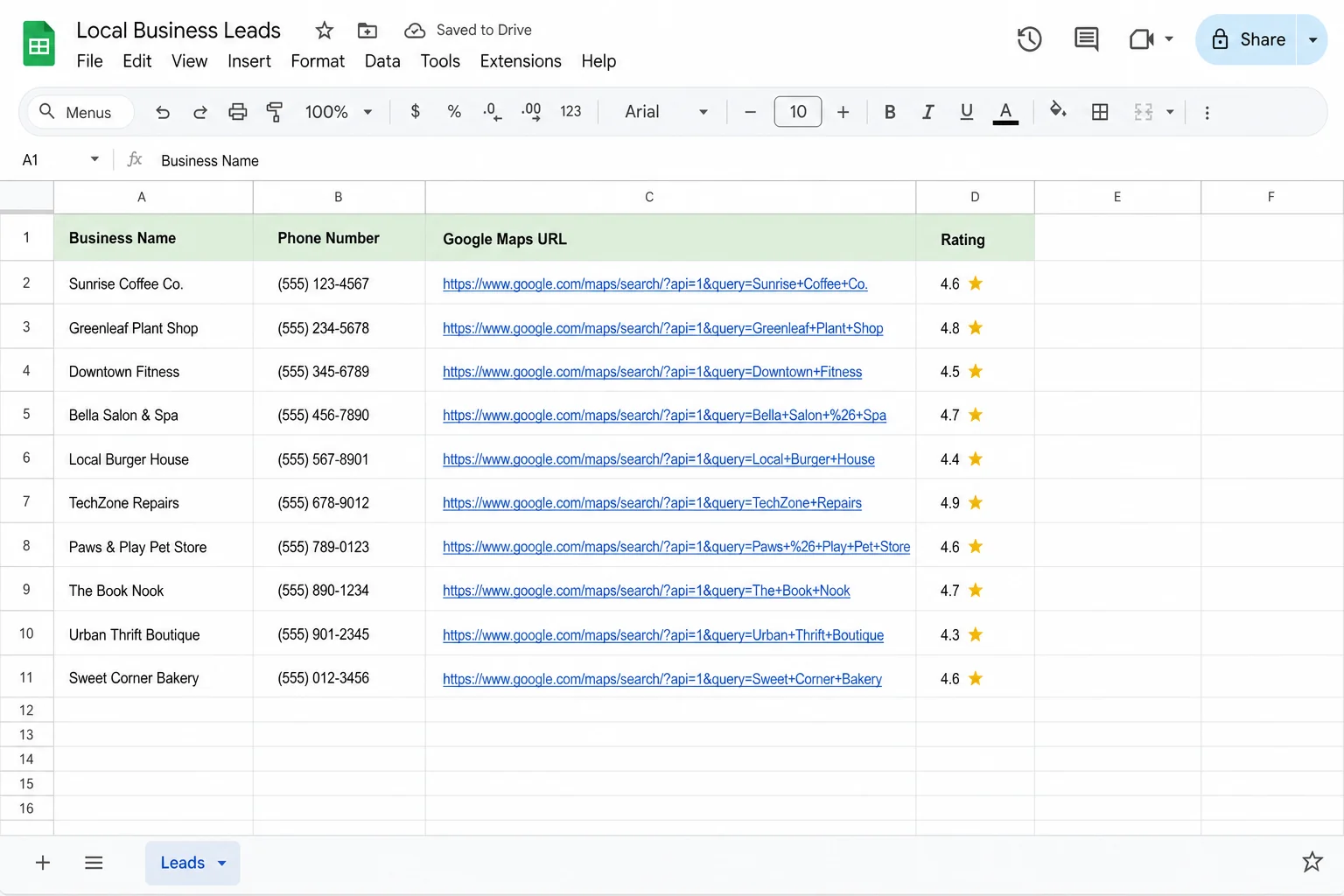
Every morning, you open a Google Sheet. That sheet has five new local businesses added to it overnight. Each row has the business name, phone number, Google Maps link, ratings, and a flag confirming whether or not they have a website. Every business in that sheet has been pre-filtered to show only those without a website, because those are the ones who need your services.
For each of those businesses, a separate AI tool has already visited their Google Maps profile, pulled their photos, ratings, and business details, and built a single-page demo website using that exact data. Each website is live on GitHub, with a shareable URL sitting in a new column in the same sheet.
All you need to do is call or email those businesses and say: "I noticed your business doesn't have a website. I went ahead and built one for you. Here's the link."
That is the system. Two free tools, one Google Sheet, one outreach message. If you are looking to sell AI websites to local businesses and earn ₹7,000 to ₹10,000 per deal, this is one of the most direct ways to start filling your pipeline.
The Two Free Tools That Power This
The whole system runs on two tools, and both are free to use.
Hermes Agent
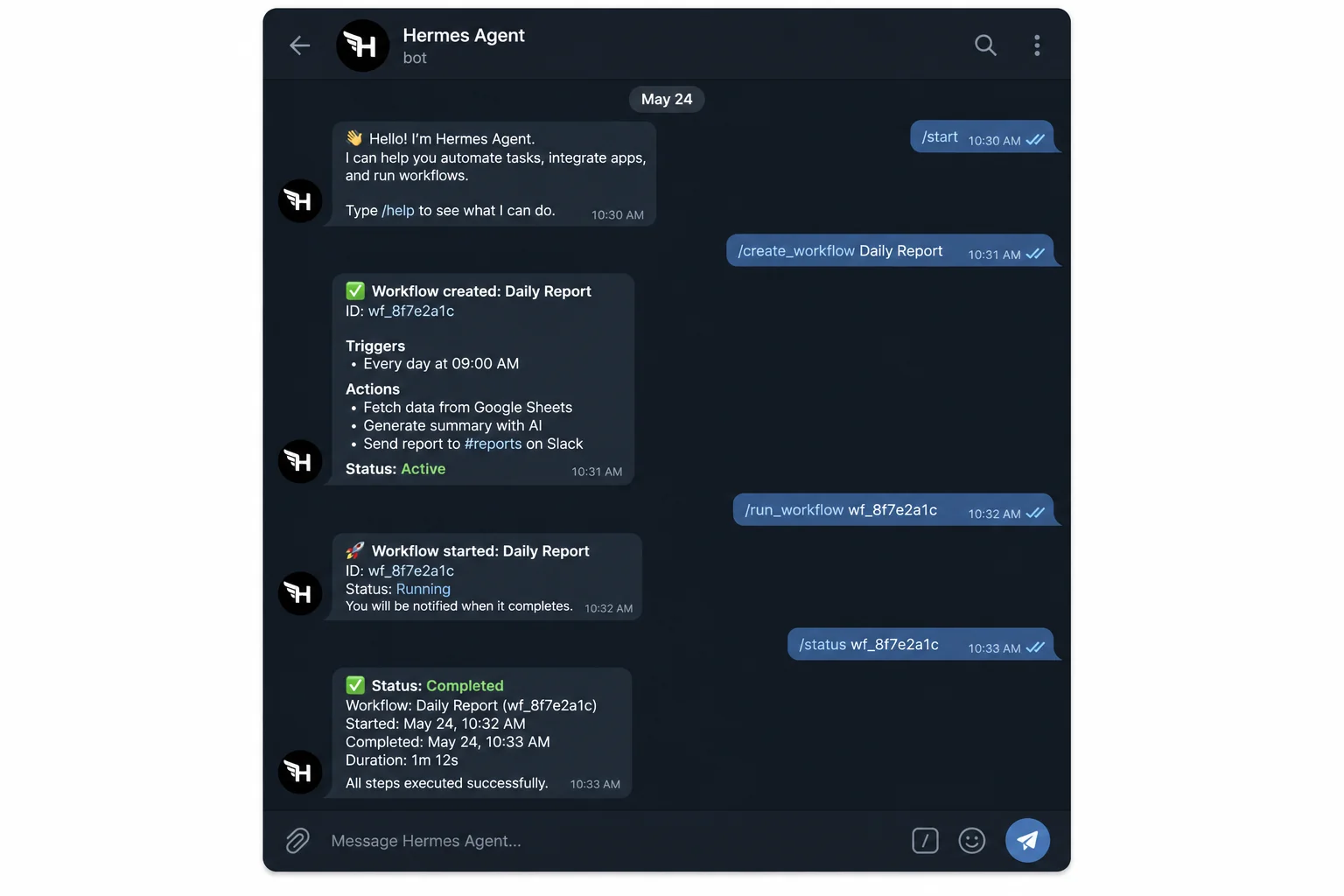
Hermes Agent is an open-source, self-hosted AI agent you control via Telegram. You type instructions to it like you would a chat message, and it goes off and executes multi-step tasks on your behalf. It can browse the web, interact with APIs, write data to Google Sheets, send emails, and more. The important thing is that it keeps working even after you close the app, as long as you have it running somewhere.
If you run Hermes Agent on your laptop, it stops when you shut down. To make it run 24/7, you need to host it on a VPS (Virtual Private Server). That is where Hostinger VPS comes in, which we will cover in the next section.
Hermes is part of a growing wave of AI agents that can replace entire agency workflows, handling research, outreach, data entry, and more without any manual involvement.
Google Antigravity
Google Antigravity is Google's agent-first IDE, released in November 2025 alongside Gemini 3. Think of it like Cursor or VS Code, but rebuilt from the ground up to have AI agents do the work, not just suggest code. It has a built-in Agent Manager, browser automation support, and multi-agent orchestration.
For this system, Antigravity is the tool that reads your lead sheet and builds a customized website for each business automatically. You give it one prompt, point it at the Google Sheet, and it does the rest, including pulling photos from Google Maps, building the HTML/CSS, and deploying each site to GitHub Pages.
Both tools are completely free on desktop. You can download Google Antigravity directly from their website for Mac or Windows with no subscription required.
Setting Up Hermes Agent (Including VPS)
There are two ways to run Hermes Agent. On your laptop for free, or on a VPS so it runs 24/7 even while you sleep.
Running It Locally (Free)
If you just want to test it first, you can install Hermes Agent directly on your laptop. The setup is a bit technical but well documented. The main downside is that the agent stops working the moment you close your laptop or put it to sleep. For daily automated lead generation, that is a real limitation.
Running It on a VPS (Recommended)
For the system to actually run overnight and add leads to your sheet before you wake up, you need it hosted on a server. Hostinger's VPS is the most beginner-friendly option for this. Their KVM2 plan is the one most people use, and it costs around ₹1,500 per year with the coupon code SOLO20, which gives 20% off any 12-month or longer plan.
Once you have the VPS set up, here is how you deploy Hermes Agent on it:
- Log into your Hostinger account and go to your VPS purchase under Manage.
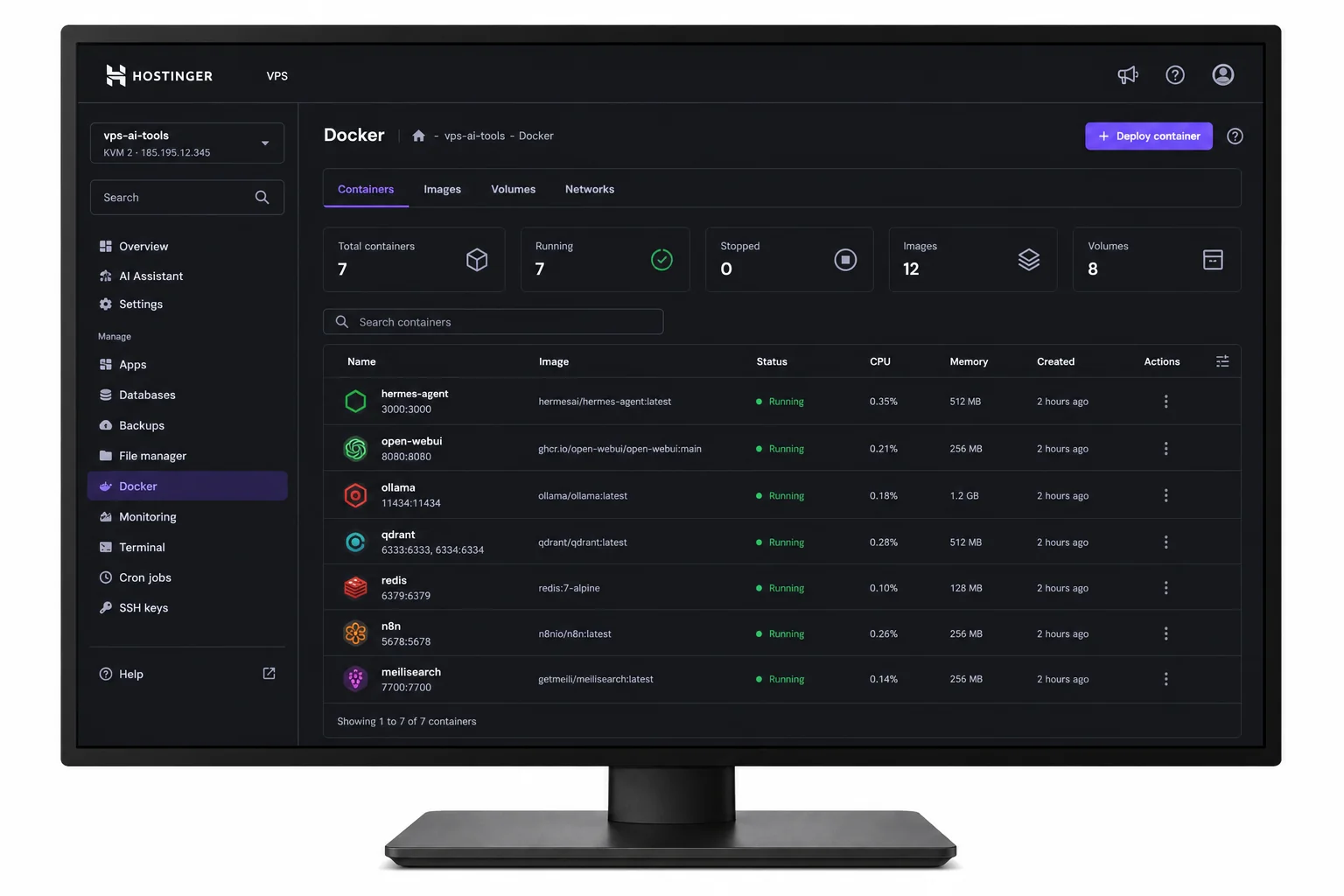
- Open the Docker Manager.
- Click on Catalog and search for "Hermes Agent."
- Select it, fill in an admin username and password, and click Deploy.
That is literally it. One-click deployment. The same Docker catalog also has Dify, OpenClaw, and other AI tools you can add later, all hosted on the same VPS. Once Hermes is live, you access it through Telegram and start giving it instructions.
This is the same kind of setup that powers many of the AI businesses you can start this week, a VPS running agents in the background while you focus on other things.
Connecting Apify for Google Maps Scraping
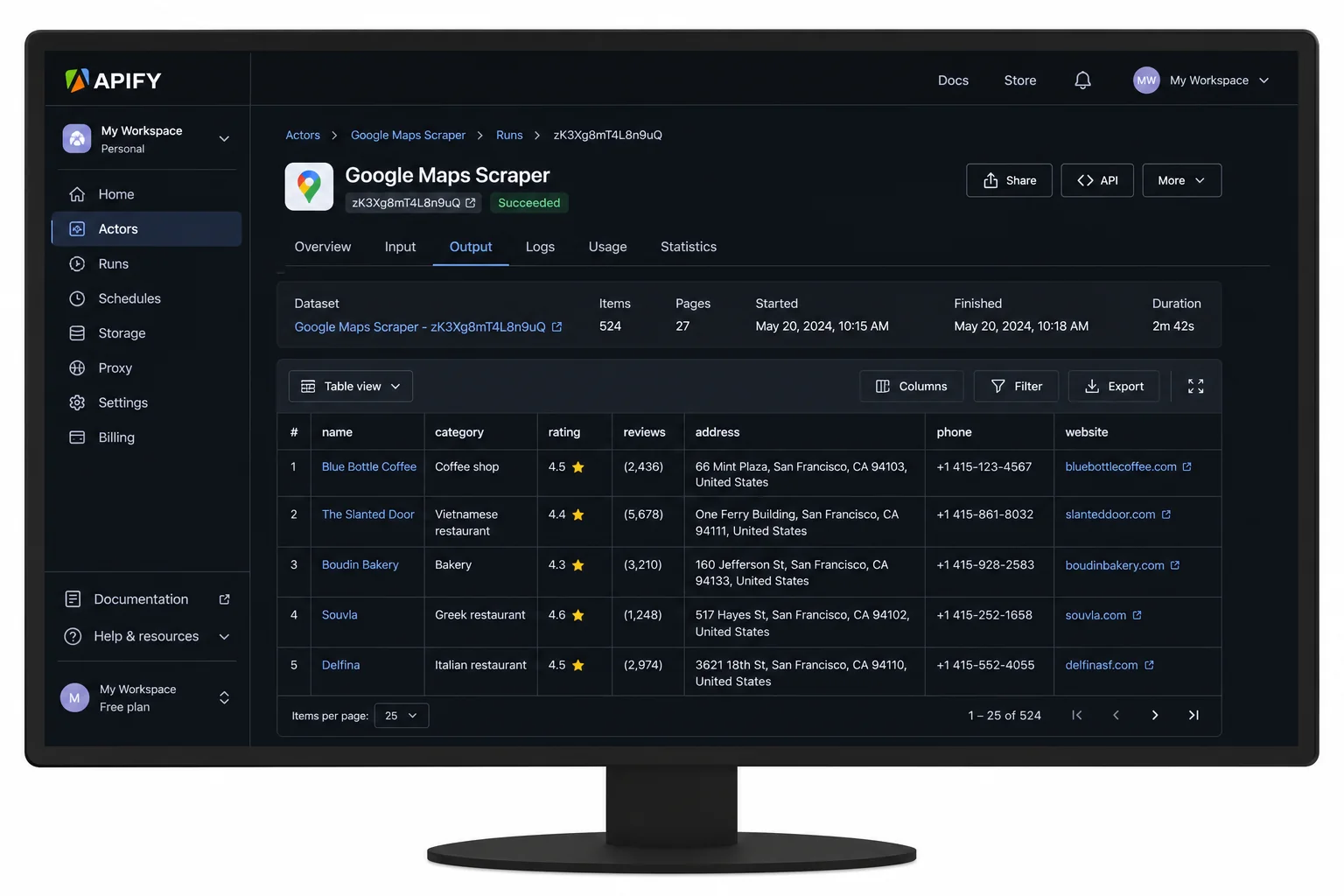
Hermes Agent can browse the web on its own, but Google actively blocks automated scraping attempts. That is where Apify comes in.
Apify is a platform with pre-built scrapers called Actors. The one you need is the Google Maps Scraper. It can pull business names, phone numbers, ratings, website URLs, Google Maps links, and more from any search on Google Maps. Because it is an official API integration, it does not get blocked the way a raw browser scrape would.
How to Connect Apify to Hermes Agent
- Sign up for a free Apify account. You get $5 in free credits to start, which is enough to scrape a solid batch of leads.
- In Apify, go to Settings → API & Integrations and copy your API key.
- Open your Telegram chat with Hermes Agent.
- Tell it: "I want you to use Apify Scraper to scrape businesses for me. Here is the scraper link: [paste Google Maps Scraper URL]. Here is my API key: [paste key]."
Once connected, Hermes can make API calls to Apify on your behalf. Every time it runs a lead generation cycle, it fires a request to the Google Maps Scraper, pulls the results, filters for businesses without websites, and writes five of them into your Google Sheet.
The Prompt That Kicks It All Off
Here is the exact type of prompt to give Hermes Agent in Telegram to start the automation:
I need to set up an automation in which I want you to find 5 local businesses in [your city] that don't have a website every day. Maintain a Google Sheet that stores their information like email, phone number, Google Maps link, business name and other important data. Let's set it up. Let me know what all you need from me.
Hermes will ask for your Google account access (to write to Sheets), your Apify API key, and the scraper link. Once those are provided, it sets up the full automation. You can customize the location and business type, so instead of "local businesses in Bangalore," you might say "cafes in Pune" or "dental clinics in Hyderabad."
In one test run, Hermes found 1,249 cafes in a single city. Of those, 653 had no website. That is your addressable market in one search.
Building Demo Websites with Google Antigravity
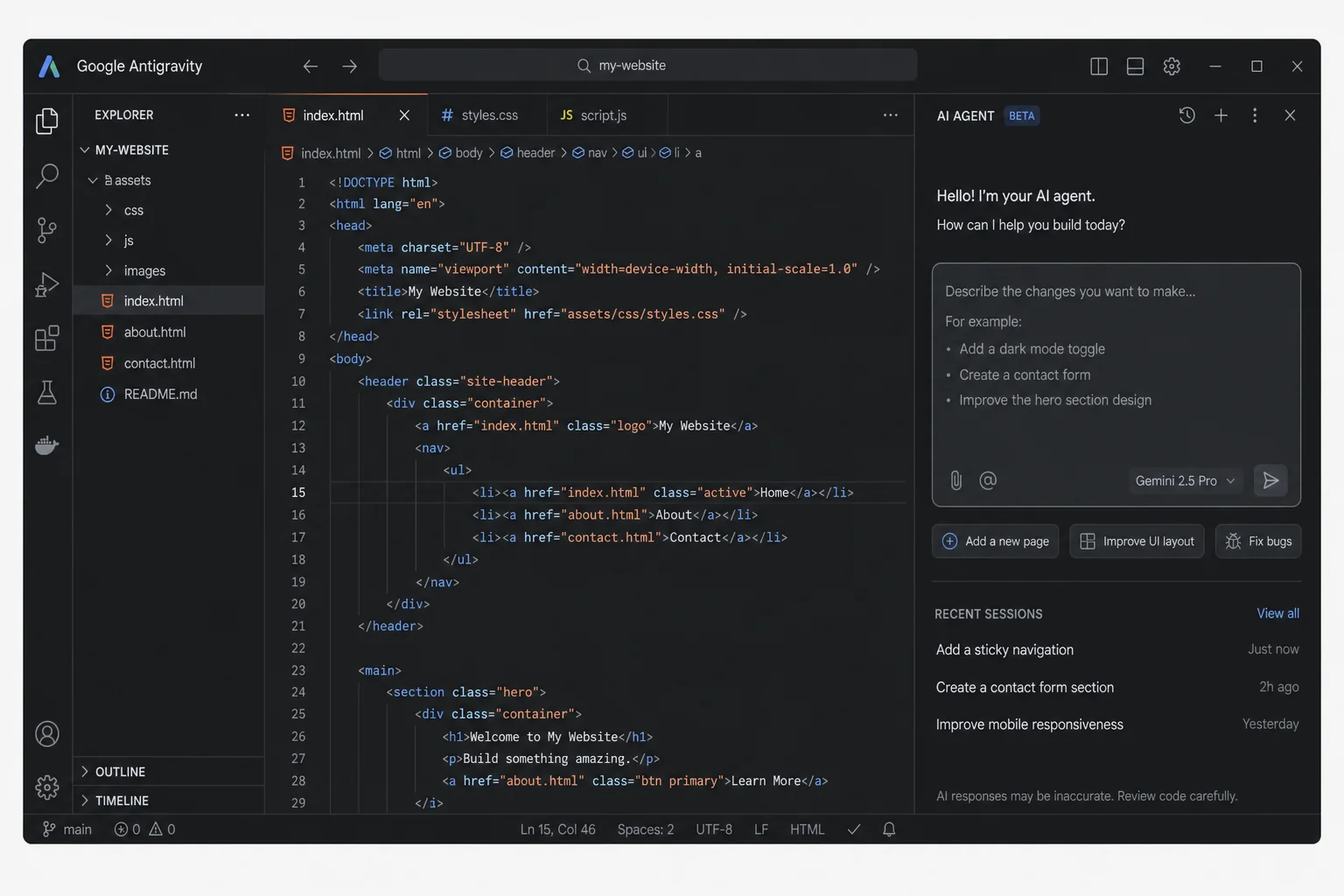
Once your Google Sheet has leads in it, the next step is getting Google Antigravity to build a demo website for each one.
Installing Antigravity
Download Google Antigravity from their official website. It is available for both Mac and Windows. Installation is straightforward and does not require any developer setup. Once open, you will see an interface similar to VS Code with a prompt panel on the right side. Choose your model from the dropdown, Opus for speed or Sonnet for deeper reasoning.
Before giving it any prompts, connect your GitHub account. Just type "connect my GitHub account" in the chat and Antigravity will walk you through the steps. GitHub is free to sign up for, and you will need it to host the demo websites.
The Prompt That Builds the Websites
Once Antigravity is set up and your lead sheet is ready, share the Google Sheet link with "Anyone with the link can view" permissions (or editor access if you want it to write back to the sheet), then paste the link into Antigravity with this prompt:
This is a Google Sheet which includes leads data. I want you to understand each business and create a customized website for them. I will be pitching my website development services to all of these businesses. I will be using the website you created for each as a demo. I want you to use images on the websites either generated with AI or picked from their Google Maps / Google Business profile. At the end, once the website is built, host each website on GitHub and put the URL in a new column in the same sheet.
Antigravity takes it from there. For each business in your sheet, it:
- Reads the business name, category, location, and ratings from the sheet
- Visits the Google Maps profile and pulls photos and menu or service data
- Generates a clean single-page HTML/CSS website with that real data
- Deploys the site to GitHub Pages for free
- Drops the live URL back into a new column in your Google Sheet
This is exactly the kind of workflow that tools like GHL AI Studio's lead generation system are built around — letting AI handle the repetitive production work while you handle the relationships.
What the Demo Websites Look Like
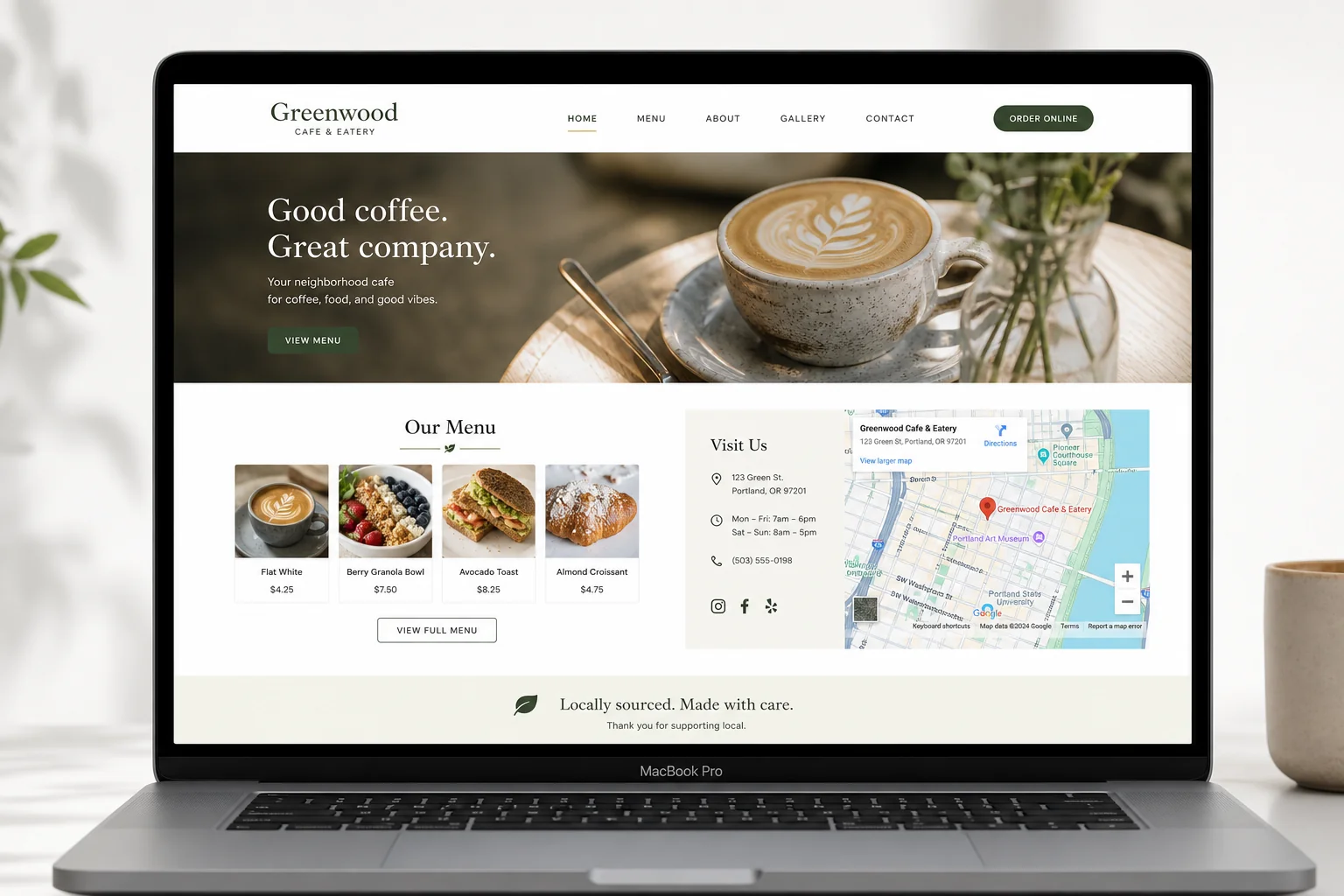
The websites Antigravity builds are single-page sites that look genuinely professional. In tests run for local cafes, the output included:
- Real photos pulled from the Google Maps business profile
- Accurate Google rating and review count displayed in a badge
- Business hours, phone number, and WhatsApp link as clickable buttons
- A clickable "Get Directions" button linking directly to Google Maps
- A menu section showing popular dishes (pulled from the Maps profile)
- An embedded Google Map at the bottom of the page
The sites are clean, mobile-friendly, and customized with that business's actual name, branding colors, and data. When you show this to a local cafe owner, it does not look like a generic template. It looks like you built something specifically for them.
That specificity is what makes this approach convert better than a cold pitch. You are not asking for a sale. You are showing them work you already did for free. The natural response is "how much to make it better?"
A Note on Processing Speed
Antigravity is a solid free tool but it does take some time to build multiple sites in one run. If you want to speed things up significantly, Claude Code (Anthropic's command-line coding agent) can handle the same prompts faster. That said, for anyone starting out and building this system for the first time, Antigravity is a great free option that gets the job done.
Pitching Local Businesses with Your Demo
Once your sheet has leads and demo website URLs, you have two main options for reaching out.
Option 1: Call Them Directly
If your sheet includes phone numbers (which it will for businesses that have a Google Maps profile), a direct call is the highest-converting option. The pitch is simple: "Hi, I noticed your business doesn't have a website yet. I went ahead and built a free demo for you, would you like me to send the link?" Most people will say yes, and once they see the website you made specifically for them, the conversation moves fast.
Option 2: Visit Them In Person
For local businesses that are nearby, walking in and pulling up the demo on your phone is incredibly effective. The visual proof is right there in front of them. You can say "Here is what your website looks like right now. I can have a full version, with a contact form and a booking system, ready in two days."
Option 3: Automate Email Outreach with Hermes Agent
For businesses where you have an email address (more common when you are targeting businesses that already have some web presence but need other services), you can take this a step further. Go back to Telegram and give Hermes Agent one more prompt:
Send emails to all the leads in the Google Sheet. Use the demo website URL I built for each of them in the email body. Pitch my website development services and introduce myself as a web developer. Keep the tone friendly and professional.
Hermes will draft the emails, pull in the specific demo URL for each business, personalize the message with the business name, and send them automatically. This turns the entire process into a hands-off pipeline. You can even refine the email copy and add your portfolio link or a Calendly booking link in the prompt.
This kind of automated outreach combined with AI-built deliverables is one of the core strategies behind modern AI automation workflows that agencies are building today.
Managing Apify Credits Efficiently
Apify gives you $5 in free credits when you sign up. Here is something worth knowing before you start: scraping at scale eats through those credits faster than expected.
In a single test run that found 1,249 cafes across a city, about $1 was consumed. That is three or four full city searches on the free plan. For a daily automation that adds just five leads per day, the usage is much smaller and the free credits can last a while.
A few ways to stretch the credits:
- Set the daily limit to five leads in your Hermes prompt, not hundreds. You do not need to scrape everything at once.
- If you hit the free limit, create a new account. It is not the ideal long-term solution, but it works for getting started.
- You can also download existing run data from Apify as a CSV without spending extra credits. Any run you have already completed stores the results and lets you export them for free.
For anyone seriously scaling this, a paid Apify plan is worth the investment once you have validated the system and are closing clients regularly.
Quick Recap
| Step | Tool | What Happens |
|---|---|---|
| 1. Set up Hermes Agent | Hostinger VPS + Hermes | Agent runs 24/7 without your laptop being on |
| 2. Connect Apify | Apify Google Maps Scraper | Agent scrapes local businesses and filters those without websites |
| 3. Auto-fill Google Sheet | Hermes Agent | Five new leads added to your sheet every morning |
| 4. Build demo websites | Google Antigravity | One prompt builds a custom site for each lead using their real data |
| 5. Host on GitHub | GitHub Pages (Free) | Each demo site gets a live shareable URL, added back to the sheet |
| 6. Outreach | Hermes Agent / Direct Call | Email or call each lead with their demo site URL ready to share |
Frequently Asked Questions
Do I need to know coding to use this system?
No. Both Hermes Agent and Google Antigravity are designed for non-coders. You interact with Hermes via Telegram chat, and Antigravity takes plain English prompts. The only technical step is setting up a VPS, and even that is a one-click deploy through Hostinger's Docker Manager.
Can I target any city or business type?
Yes. In your Hermes Agent prompt, you specify the city and the category of business you want. You can say "dental clinics in Pune," "salons in Chennai," or "restaurants in Guwahati." The system works for any local business segment in any city where Google Maps has listings.
What do I charge for the websites?
A single-page website for a local business typically goes for ₹5,000 to ₹15,000 in the Indian market depending on the city and the complexity. The demo you built with AI is a simplified version, so you have room to upsell a better, fully hosted site with a domain and contact form. Check the detailed breakdown in this post on how to price and close AI website deals with local businesses.
What if Hermes Agent has trouble connecting to Google Sheets?
This is one of the most common issues in the initial setup. When the connection fails, just troubleshoot it through Telegram itself. Ask Hermes: "I'm having a connection issue with Google Sheets. Help me fix it." It will walk you through re-authenticating the connection step by step. Usually, a simple re-login to your Google account through the agent is all it takes.
Is Apify really free to start?
Yes. Apify gives $5 in free credits on signup, no credit card required. For a system that adds only five leads per day, that credit can last several weeks depending on how large each search area is. Once you start closing clients, the Apify cost is easy to cover.
Can Hermes Agent send WhatsApp messages instead of emails?
Hermes Agent supports multiple messaging gateways including Telegram, Slack, WhatsApp, and Discord. If you want it to send WhatsApp outreach messages to leads, it is possible to configure with the right WhatsApp API setup. That is a more advanced workflow but is achievable with the same agent.
Conclusion
The combination of Hermes Agent and Google Antigravity creates something most freelancers and agencies are still doing manually: finding prospects, researching them, building something for them, and reaching out with a warm pitch.
This system does all of that automatically. You set it up once, point it at a city and a business category, and it runs every day without your involvement. By the time you check your Google Sheet in the morning, you already have fresh leads with live demo websites ready to share.
The key to making this work is not just the automation but the positioning. You are not cold pitching. You are showing up with proof of your work already done. That changes the entire sales conversation and dramatically increases your close rate.
If you want to take this further and start running these as actual client projects, read up on the AI businesses you can realistically start this week, and how to structure your pricing and delivery. The tools are free. The opportunity is real. The only thing left is to start.