GoHighLevel Review & Tutorial 2026: Is It Still the Best All-in-One CRM for Agencies?
A complete GoHighLevel review and hands-on tutorial for 2026 — covering pricing, automation, AI agents, white-label SaaS, and whether it's actually worth building your business on.

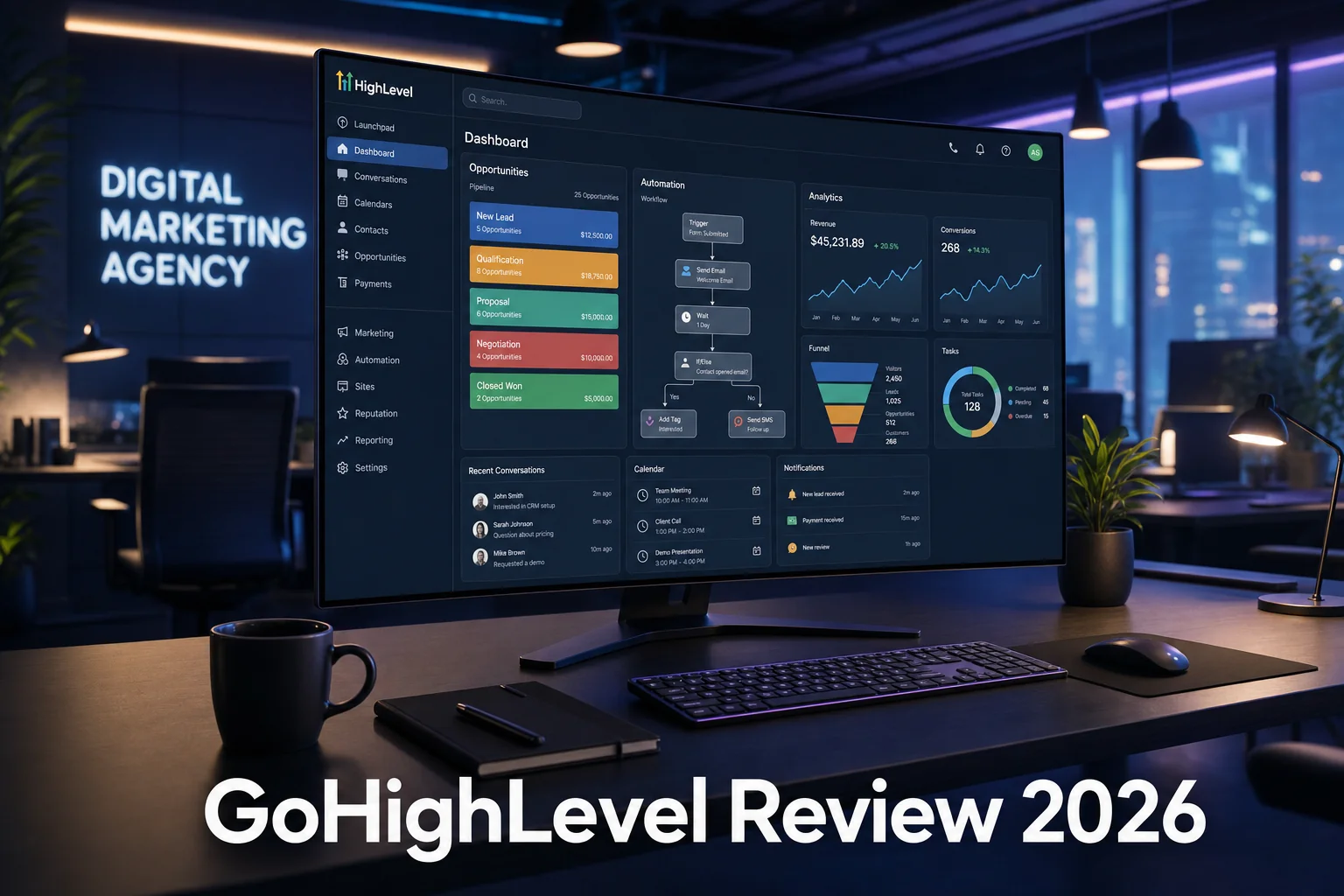
Let's Get the Obvious Question Out of the Way First
If you just discovered GoHighLevel and your first thought was "wait, is this a pyramid scheme?" — you're not alone. It's probably the most common first impression people have, and honestly, it's a fair one to have.
Here's the short answer: no, it's not a pyramid scheme. Almost every major software platform on the planet has a referral program and certified consultants who help users get started. GoHighLevel is no different. What is different about GHL is its pricing model — unlimited accounts, unlimited users, unlimited features under one subscription. That's the kind of thing that makes agencies, franchises, and software companies sit up and pay attention.
The real reason people started talking about it like it was some kind of scheme is because GoHighLevel opened up its SaaS reselling program — where anyone can put their own brand on the platform and sell it to small businesses as their own software product. Overnight, starting a software company went from costing hundreds of thousands of dollars to a few hundred bucks a month. People got excited, some overpromised, and the internet did what the internet does.
But underneath all that noise is a genuinely powerful piece of software. And in 2026, it's only gotten better.
This review covers everything — pricing, the agency setup, the sub-account CRM features, automation, AI agents, and a step-by-step tutorial so you can see exactly how it all works before you decide. Let's get into it.
What Is GoHighLevel, Really?
GoHighLevel (or GHL) is an all-in-one CRM and marketing automation platform built specifically for agencies, consultants, and businesses that want to consolidate their tech stack. Instead of paying for separate tools for email marketing, SMS, appointment scheduling, website hosting, CRM, and automation — GoHighLevel bundles all of that into a single subscription.
Here's what you can do inside a GoHighLevel account:
- Capture leads through forms, surveys, quizzes, and chat widgets
- Automate follow-up via SMS, email, and phone calls
- Host your website and landing pages
- Manage calendars and appointment booking
- Run two-way conversations across SMS, email, Instagram DMs, Facebook, WhatsApp, and TikTok — all from one inbox
- Make and receive phone calls with call recording and transcription
- Build full AI agents for voice and chat
- Create and sell courses and communities
- Send invoices and collect payments
- White-label the entire platform and resell it as your own software
That last point is what separates GoHighLevel from tools like HubSpot or Keap. You're not just a user — you can become a software company. Start your free 30-day GoHighLevel trial here and see what it can do for your business.
GoHighLevel Pricing in 2026: Which Plan Do You Actually Need?
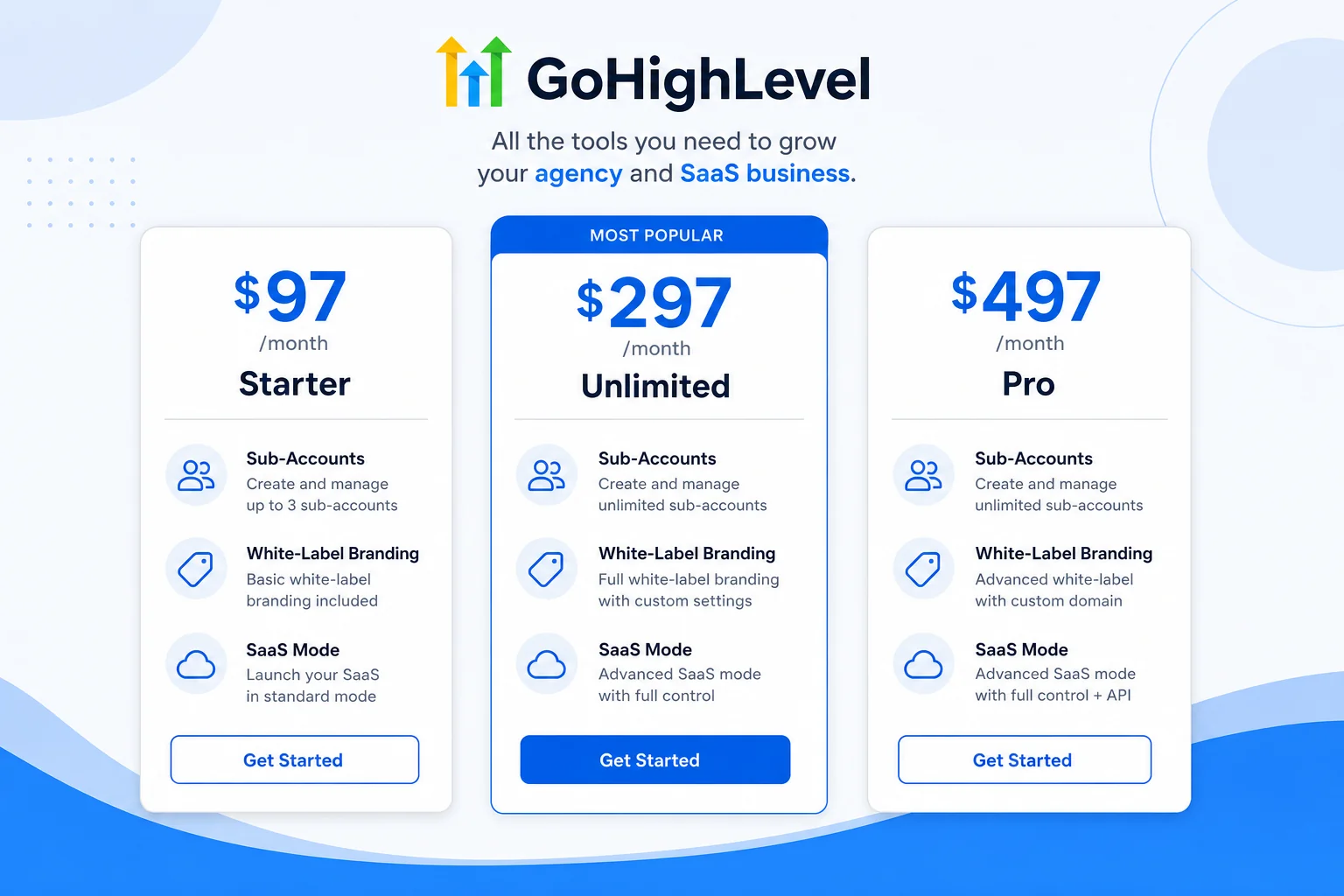
GoHighLevel has three plans, and choosing the right one depends on what you're actually trying to do with the platform.
Starter Plan — $97/month
This is where most people begin. For $97 a month, you get one agency account plus three sub-accounts, which means you can run three separate business accounts from a single login. You get access to nearly every CRM and automation feature, and you can white-label the app. It's a solid starting point if you're learning the platform or if three sub-accounts covers your needs.
One catch: on this plan, any SMS, email, or AI usage costs come out of your own pocket. You can't pass them on to your clients — that feature is locked to the higher tiers.
Unlimited Plan — $297/month
Two major upgrades here. First, you go from three sub-accounts to unlimited. Second, you get the ability to rebill usage costs — SMS, email, AI responses — directly to your clients' cards instead of absorbing them yourself. For a local business client sending a few hundred texts a month, that's usually $20–$30 in additional costs. On this plan, that goes to their card, not yours.
For most agencies and SaaS resellers, this is the plan that makes the business model actually work at scale.
Pro Plan — $497/month
Two additional features that push this plan into a different category entirely. First, you can mark up usage costs — so instead of just passing along the $20–$30 to your client, you can charge them $40–$60 and keep the difference. That's standard practice across every SaaS product on the market, and GoHighLevel lets you go up to a 10x markup.
Second — and this is the big one — you get SaaS Mode. SaaS Mode gives you a self-checkout page where clients can sign up, enter their payment info, and get their own account automatically provisioned. On the $297 plan, you have to manually create each account. On the $497 plan, the whole thing runs like a real software product because it essentially is one.
Understanding the Two Levels: Agency vs. Sub-Account
Before going deeper into features, you need to understand how GoHighLevel is structured. There are two distinct levels, and confusing them is one of the most common mistakes new users make.
The Agency Level
Think of the agency level as a utility company that provides power to a neighborhood. Your clients never see this side of things, but you use it to manage everything — creating sub-accounts, setting up white-label branding, configuring plans, managing billing, and controlling which features each client gets access to.
From the agency dashboard, you can switch into any of your client sub-accounts instantly, see reporting across all of them, and control their plan settings without them ever knowing you're there.
Inside the agency settings, you set your white-label domain (so clients log in at something like app.yourbrand.com), upload your logo, and optionally customize the color scheme. You can also use Custom Menu Links to add external tools or third-party apps that appear natively inside your clients' accounts — making it feel like one seamless product.
The Sub-Account Level
This is where the actual CRM, automation, and AI features live. Each sub-account represents one business. When you create a sub-account, you can load it with a snapshot — a pre-built collection of templates, workflows, websites, and automations. GoHighLevel provides default snapshots for dozens of industries, and you can build and save your own once you've customized a perfect setup for a specific niche.
The snapshot system is one of GoHighLevel's most underrated features. Once you've designed the perfect setup for a pet groomer, a dentist, or a real estate agent, you can copy it into every new client account with a few clicks. No starting from scratch every time.
How to Actually Get Leads Into GoHighLevel
GoHighLevel has over 20 different ways to capture leads, but let's focus on the ones you'll actually use day-to-day.
Forms, Surveys, and Quizzes
The simplest way to capture leads is through GoHighLevel's built-in form builder. You can drag and drop fields, use conditional logic, and embed the form on any website — including sites built inside GoHighLevel itself. Surveys work the same way but present one question per slide, and quizzes add branching logic based on how people answer.
Every submission automatically creates or updates a contact record, populating your CRM without any manual data entry.
The All-in-One Chat Widget
GoHighLevel's chat widget can combine SMS, email, live chat, WhatsApp, Facebook Messenger, Instagram DMs, and Voice AI — all from a single widget on your website. When someone interacts with any of those channels, the conversation shows up in your unified inbox.
Phone Numbers and Calling
You can purchase local phone numbers directly inside GoHighLevel and use them for inbound and outbound calling, SMS campaigns, and call tracking. Calls can be forwarded to mobile phones, routed through desk phones, or answered by a Voice AI agent. All calls are recorded and transcribed automatically.
For agencies with international clients, GoHighLevel also supports third-party SMS providers as an alternative to its native Twilio-powered system — which can be useful if Twilio rates are steep in your market.
Social Media and DMs
Connect Facebook, Instagram, and TikTok, and every DM lands in your GoHighLevel inbox. You can automate responses, trigger workflows based on comments, and even respond to Facebook and Instagram comments through automation — a feature that would otherwise require a separate tool.
Payments and Invoicing
When someone fills out a checkout form or pays an invoice, they're automatically added to your contacts. GoHighLevel integrates with Stripe, PayPal, and dozens of other payment processors, and you can build full e-commerce funnels with order bumps and upsells directly inside the platform.
Imports and Integrations
You can bulk import contacts from a CSV, or connect GoHighLevel to external tools via native integrations, Zapier, Make, or Pabbly. If you're already using an automation tool like Pabbly or Zapier, connecting your existing systems to GoHighLevel is straightforward.
The Pipeline and Opportunity System
Once leads are in your system, GoHighLevel's pipeline view lets you manage where each contact sits in your sales process. You create custom pipeline stages — New Lead, Hot Lead, Appointment Booked, Closed, etc. — and then drag opportunity cards through those stages as contacts progress.
The dashboard updates in real-time, showing you opportunity value, conversion rates, funnel progression, and stage distribution. You can create multiple pipelines — one for marketing, one for project delivery, one for onboarding — and switch between them instantly.
The best part? You can automate the movement of contacts through your pipeline, so you're not manually dragging cards around.
GoHighLevel Automation: Building Your First Workflow
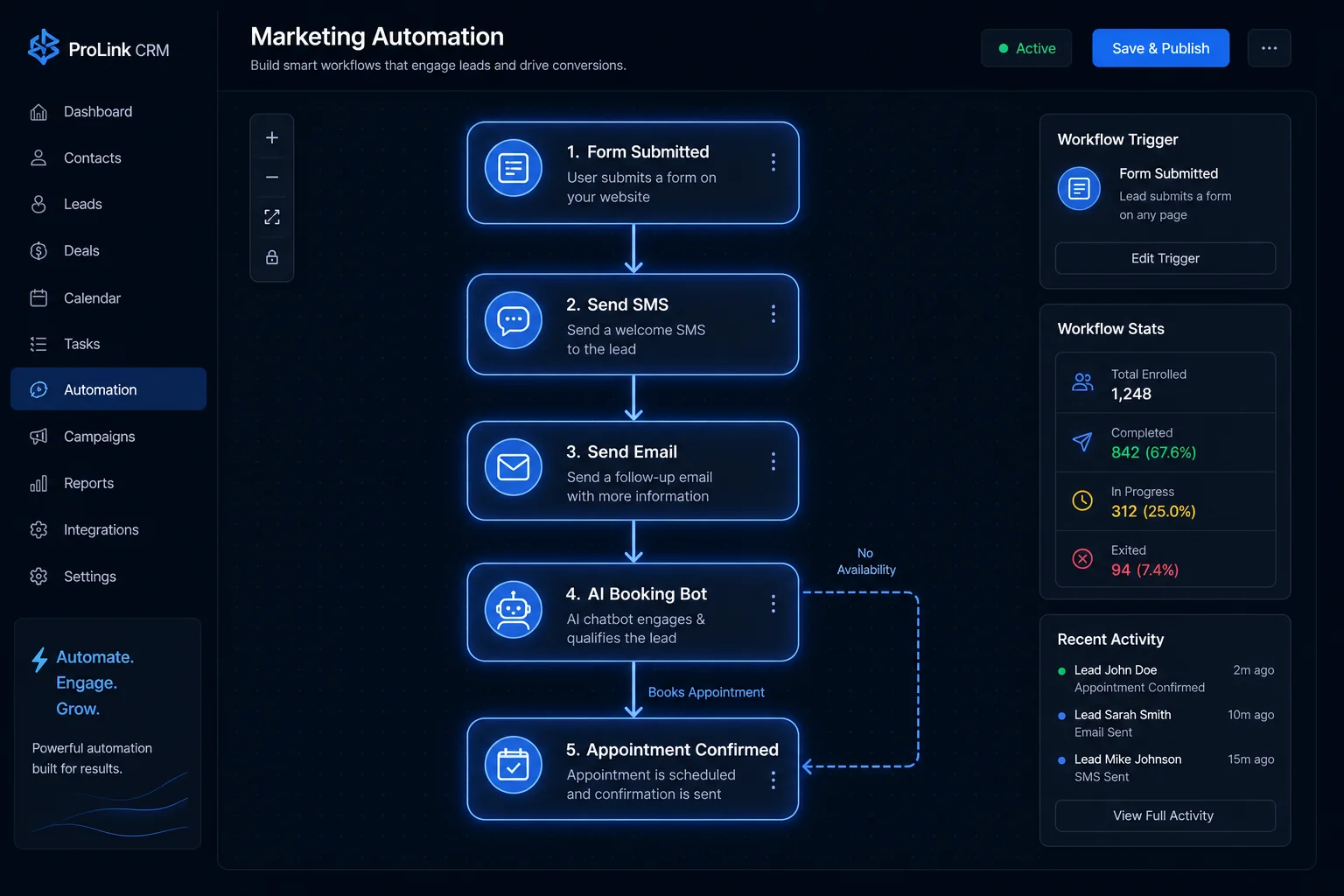
The workflow builder is where GoHighLevel starts to feel genuinely unfair compared to other tools. You have over 120 different automation actions available, covering everything from sending texts to updating pipeline stages to booking appointments with AI.
Here's how a basic "Fast Five" new lead workflow looks when built from scratch:
Step 1 — Create the Opportunity
The moment someone submits a form, the workflow fires. The first action creates an opportunity in your pipeline — logging the new lead automatically, assigning a value, and placing them in the "New Lead" stage. Your dashboard updates instantly.
Step 2 — Send an Email
Next, an automated email goes out to the lead with a personalized greeting (pulling their first name from the form submission using dynamic custom values), a CTA to book an appointment, and your calendar link. GoHighLevel has a built-in AI email composer that writes a solid draft in seconds.
Step 3 — Send an SMS
At the same time, a text message fires. Not a salesy blast, but a conversational opener — something like checking in about their last experience, naturally leading into the offer. This two-channel approach dramatically increases response rates compared to email alone.
Step 4 — Internal Notification
The business owner gets an internal SMS or email alert: new lead just came in, follow-up is in progress. They're in the loop without having to check a dashboard.
Step 5 — The AI Appointment Booking Bot
If the lead responds to the SMS, the AI booking bot takes over the conversation. It reads the calendar availability, suggests open slots, and books the appointment — all without any human involvement. If the lead doesn't respond within 5 minutes, a call-connect action fires: the system calls the business owner, plays a whisper message ("You have a new lead that hasn't responded"), and if they press any key, it immediately dials the lead.
That combination of speed, personalization, and AI escalation is what makes GoHighLevel accounts genuinely convert at a higher rate than manual follow-up ever could.
Additional Workflow Triggers to Know
GoHighLevel triggers go well beyond form submissions. You can fire workflows based on:
- Appointment confirmations, no-shows, and cancellations
- Opportunity stage changes
- Email opens and link clicks
- Contact birthdays
- Payment completions
- Facebook, Instagram, and TikTok comment triggers
- IVR phone tree interactions (press 1 for sales, press 2 for support)
- Inbound calls and missed calls
- Course enrollment and community activity
GoHighLevel also has a built-in Workflow AI assistant that can modify or extend your existing workflows based on plain-English instructions — useful when you want to add a step without digging through documentation.
GoHighLevel AI Agents: Voice AI and Conversation AI
The AI features in GoHighLevel have matured significantly. There are two main types of agents: Voice AI and Conversation AI.
Voice AI Agents
Voice AI agents handle inbound phone calls autonomously. The most common use case is an after-hours or missed-call agent — a bot that picks up when the front desk can't, greets the caller naturally, answers FAQs from a knowledge base, and books appointments directly on the calendar.
You configure the agent with a name, a voice (there are dozens of realistic options), a knowledge base, and a detailed prompt that tells it exactly how to behave in different scenarios. GoHighLevel's Voice AI supports appointment booking, call transfers, workflow triggering, and sending follow-up SMS messages during the call.
You can also set working hours for the agent — for example, have it active only on weeknights and weekends — and GoHighLevel will route calls to it automatically during those windows. If you want to integrate more sophisticated voice agents, check out our guide on building Retell AI voice agents inside GoHighLevel. For a broader comparison of the best options available, our roundup of the best voice AI agents for agencies is worth a read.
Conversation AI Agents
Conversation AI handles text-based channels — SMS, Instagram DMs, Facebook Messenger, WhatsApp, email. You create a separate bot for each channel (keeping the scope narrow dramatically improves reliability), give it a knowledge base and instructions, and set it to Autopilot mode so it responds without waiting for your approval.
The key principles here: keep each bot's job small and specific. An Instagram DM bot should only handle Instagram. A booking bot should only book appointments. The more you try to make one bot do, the more likely it is to confuse itself.
GoHighLevel charges nothing extra for additional AI agents — you can create unlimited Voice AI and Conversation AI agents inside each sub-account.
White-Label SaaS: Turning GoHighLevel Into Your Own Software Product

This is the part that makes GoHighLevel genuinely unique in the CRM space. You can put your own brand on the entire platform — your logo, your domain, your colors — and sell it to local businesses as your own software product. Your clients log into app.yourbrand.com and see your brand everywhere. GoHighLevel is invisible to them.
The white-label setup takes maybe 20 minutes. You upload your logo, point a custom domain at GoHighLevel's servers, and you're done. On the $497 Pro plan, you can set up SaaS Mode, which gives you a public-facing checkout page so clients can sign up, pay, and get their account provisioned automatically — just like any other SaaS product.
You control which features each plan includes, what it costs, whether there's a free trial, and how usage costs are passed on. It's a genuinely complete white-label SaaS infrastructure that would have cost hundreds of thousands of dollars to build from scratch just a few years ago.
Pair this with GoHighLevel's automated reputation management features and you've got a compelling offering for any local business client — one that runs largely on autopilot once it's set up.
GoHighLevel: Honest Pros and Cons
What GoHighLevel Does Really Well
- Consolidation — Replacing 8–10 separate tools with one platform cuts costs dramatically for most agencies and clients
- The workflow builder — One of the most powerful and flexible automation builders available at this price point
- Snapshot system — Lets you productize your agency and scale client onboarding without reinventing the wheel
- White-label infrastructure — Complete SaaS reselling capability that's genuinely enterprise-grade
- AI integration — Voice AI and Conversation AI built natively into the platform, no additional subscriptions required
- Pricing model — Flat monthly fee regardless of how many clients or contacts you have is genuinely disruptive
Where GoHighLevel Has Room to Improve
- Learning curve — The platform is massive. It takes time to learn properly, and trying to use every feature at once is overwhelming
- SMS registration — In the US and Canada, A2P 10DLC registration is required before you can send texts. It's manageable but adds friction to getting started
- UI can feel cluttered — With so many features, some areas of the interface aren't as polished as dedicated single-purpose tools
- Support response times — Can vary depending on the complexity of your issue
Who Is GoHighLevel Actually For?
GoHighLevel is best suited for:
- Marketing agencies that manage lead generation for multiple clients and want everything in one place
- Consultants and coaches who want to automate their lead nurturing and client communication
- SaaS resellers who want to launch their own branded software business targeting local businesses
- Franchises and multi-location businesses that need centralized management with location-level control
- Solopreneurs and small businesses who want the capabilities of an enterprise CRM without the enterprise price tag
It's probably overkill if you're a freelancer who only needs a basic email list and a booking link. But for anyone running or building a client-facing service business, the value-to-cost ratio is extremely hard to beat.
If you're ready to explore it yourself, grab your free 30-day GoHighLevel trial through this link — no credit card required to get started.
Quick-Start Tutorial: Getting a Functional System Running
Here's the condensed version of what you need to set up to have a working GoHighLevel system for your first client:
- Create your sub-account and load a relevant industry snapshot
- Set up your phone number and complete registration (US/Canada: A2P 10DLC)
- Configure your email service by creating a dedicated sending domain under Email Services in settings
- Connect your social channels — Facebook, Instagram, and TikTok under Integrations
- Build or customize your lead capture form and embed it on your website or funnel
- Create your pipeline with stages that match your actual sales process
- Build your core workflows — new lead nurture, appointment confirmation, no-show follow-up, review request
- Set up your knowledge base and create a Voice AI agent for missed calls/after hours
- Test everything by submitting a real form and walking through the experience as a lead
Don't try to build everything at once. Set up the basics, let real leads run through the system for a week, and then iterate based on what you see. The workflow AI assistant inside GoHighLevel makes adding new steps fast once you know what you want.
Frequently Asked Questions
Is GoHighLevel worth it for beginners?
Yes, but expect a learning curve. The $97 Starter plan is a low-risk entry point, and GoHighLevel's own documentation plus active community resources make it learnable. Just don't try to use every feature in the first week.
Can I use GoHighLevel for my own business, not just clients?
Absolutely. Many people use GHL purely to manage their own business's leads, automations, and communications — no reselling required. Every sub-account is fully functional as a standalone CRM.
Does GoHighLevel replace Zapier or Make?
For most use cases within the GoHighLevel ecosystem, yes. The native workflow builder handles automation between GHL features without needing a third-party tool. For connecting GHL to external platforms, you'll still want something like Zapier or Pabbly.
How much does GoHighLevel cost per month including usage fees?
The base subscription is $97, $297, or $497 per month. On top of that, SMS, email, and AI usage costs apply — typically $20–$50/month for an average local business client, depending on volume. On the $297 and $497 plans, you can pass these directly to your clients.
Is the GoHighLevel white-label actually convincing?
Yes. Clients log in through your custom domain, see your logo, and interact with your brand name throughout. Unless they're specifically looking for GoHighLevel's name, they have no indication it's the underlying platform.
What's the difference between GoHighLevel and HubSpot?
HubSpot is feature-rich but expensive at scale — costs escalate significantly as your contact list or team grows. GoHighLevel is flat-rate and includes white-labeling, SaaS reselling, and agency management tools that HubSpot simply doesn't offer. For agencies managing multiple clients, GHL is typically far more cost-effective.
Does GoHighLevel have a free trial?
Yes — GoHighLevel offers a 30-day free trial that gives you full access to the platform so you can explore everything before committing.
Final Verdict: Should You Use GoHighLevel in 2026?
GoHighLevel isn't perfect, but it's as close to an all-in-one solution as the agency and small business market has ever seen. The platform has matured significantly, the AI features are genuinely useful rather than just buzzword-compliant, and the economics of the white-label SaaS model still hold up better than almost any comparable tool.
If you're an agency owner tired of juggling a dozen different subscriptions, or a consultant who wants to productize your services into a recurring SaaS revenue stream, GoHighLevel deserves serious consideration. The learning curve is real, but the payoff for getting it right is substantial.
The best way to evaluate it is just to try it yourself. Click here to start your free 30-day GoHighLevel trial and build out your first sub-account. You'll know within a week whether this is the right platform for where you're trying to take your business.