Claude Code Lessons From 1,000+ Hours: Workflow, Skills, Context, and Verification
An original, source-credited guide to The Coding Sloth's Claude Code workflow, covering skills, planning, verification, MCP, context, subagents, worktrees, and alternatives.
Claude Code lessons are easiest to apply when they are treated as a workflow, not a list of commands. In a recent 22-minute video, The Coding Sloth shared what he learned after more than 1,000 hours with Claude Code, including the features he keeps, the ones he rarely touches, and the habits that help him stretch limited usage.
This article reports those ideas in an original format and checks the product details against current documentation. The experience and opinions belong to The Coding Sloth. They are not presented as Indish Marketer's own testing.

The central message is simple: add only the context and tools a task actually needs, give the agent a way to verify its work, and start fresh before a long conversation becomes a liability.
Claude Code is more than a terminal chat
Claude Code is an agentic coding tool that can inspect files, run commands, edit a project, and work through a task. Although it began as a terminal-first experience, Anthropic's current documentation also lists IDE extensions, the web, desktop, mobile handoff, Slack, and CI/CD interfaces.
The Coding Sloth prefers an IDE-and-agent combination because it keeps the editor and clickable controls visible. He still recommends learning the underlying workflow because the same ideas transfer to other coding agents, including Codex, Cursor, OpenCode, and GitHub Copilot.
That portability matters more than memorizing every command. His video deliberately skips dozens of niche configuration options and concentrates on project instructions, skills, planning, verification, external tools, context management, automation, subagents, and worktrees.
Project instructions and skills solve different problems
The first setup layer is CLAUDE.md. The /init command helps create this project file, which can hold the project description, current status, coding conventions, build commands, and other rules that should persist across sessions.
The Coding Sloth rates the command itself as ordinary, but values a carefully maintained project file more highly. His practical examples include coding style, working philosophy, capitalization rules for user-facing copy, and preferred pull-request language. The lesson is to keep the file flexible and focused instead of treating generated instructions as permanent truth.
A skill serves a different purpose. It is a reusable guide, stored in a SKILL.md file, for a repeatable activity such as refining requirements, reviewing architecture, simplifying code, researching documentation, or following a release checklist. Anthropic's documentation confirms that skill descriptions can be available at session start while the full instructions load when the skill is used.
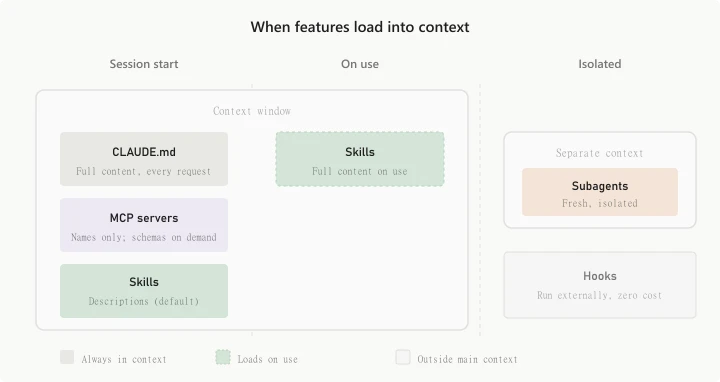
The distinction keeps a setup lean: put always-needed project conventions in CLAUDE.md, and move occasional workflows into skills. The Coding Sloth warns against installing a large pile of overlapping skills because code-quality advice is often subjective. A smaller set that matches the team's style is easier to trust.
This same reusable-workflow idea appears in other agent projects. For example, the Stitch and Antigravity mobile-app workflow uses skills to teach an agent a repeatable design process, while the n8n MCP guide shows how an agent can connect to an external system.
Plan first for large changes, then verify the result
For a substantial task, The Coding Sloth recommends Plan mode. Claude explores the project and proposes an approach before editing source files, giving the developer a chance to catch a bad assumption before it becomes a large diff. He reserves it for broad changes, not typo fixes, variable renames, or tiny visual adjustments.
He also describes a cost-conscious model split: use a more capable model to research and write the plan, then use a faster model to implement the approved steps. The exact model names and availability can change, but the division of labor is the durable part of the workflow.
Planning is only half the job. The highest-ranked practice in the video is verification. An agent should have objective signals that show whether its change works instead of merely declaring success.
- For important behavior, define or write the test before implementation.
- Run the project's type checker and linter before marking the task complete.
- For interface work, use browser interaction and screenshot checks so visual problems are visible.
- Test the behavior that matters instead of adding a test for every line.
The sequence is important. If an agent implements first and writes tests afterward, it can accidentally encode its own mistakes into tests that simply confirm the implementation. Existing workflows on this site follow the same principle: the Claude and WordPress integration guide treats tool access as only one layer, while the implementation still needs real checks.
Use MCP only when the task needs an external system
Model Context Protocol gives Claude access to systems outside the repository, such as GitHub, a database, Slack, analytics, deployment tools, or a browser. The Coding Sloth uses MCP for jobs such as design research, seeding test data, checking documentation, and browser testing.
His boundary is useful: use MCP when the agent must interact with an external service. Use a skill for knowledge, patterns, or a repeatable method. Anthropic's current feature guide draws the same line, describing MCP as the connection and skills as the instructions for using that connection well.
More servers are not automatically better. Each integration adds another capability, permission surface, and potential source of context. The video repeatedly returns to the rule of using only what the current task requires.
Small commands can improve the working rhythm
The video highlights several commands that are convenient even if they are not essential:
/voiceturns spoken input into a prompt, which can make detailed explanations faster./btwasks a side question without adding it to the main conversation history./teleportand Remote Control move work between terminal, web, and mobile interfaces.- Starting a message with
!runs shell mode while keeping the command output visible to Claude. /contextshows what is consuming the context window./compactsummarizes a long conversation to free space.
Command availability can vary by platform, plan, environment, and Claude Code version. Anthropic's current command reference is the better place to confirm a command before building a workflow around it.
Context management is a quality practice
Claude Code's context includes the conversation, file contents, command output, project instructions, loaded skills, and system instructions. The Coding Sloth argues that large contexts cost more and can make the agent less consistent as a session grows.
His first recommendation is to start a new session for a new task. His second is to stop irrelevant research tangents early. His third is to provide precise scope, including the files and sources the agent should use, so it does not spend tokens rediscovering the assignment.
Current Claude Code documentation explains that automatic compaction clears older tool output and then summarizes the conversation as the window fills. Important early detail can be lost, so persistent rules belong in CLAUDE.md. A manually focused /compact instruction can also tell Claude what the summary must preserve.
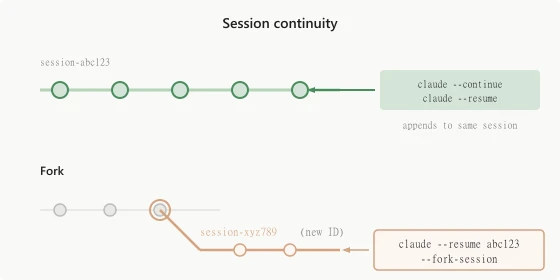
The practical goal is not to minimize every token. It is to make each token useful. A narrowly scoped task with relevant files, a clear definition of done, and an explicit verification command will usually outperform a long, unfocused conversation.
Automation, goals, subagents, and worktrees
The later part of the video moves from single tasks to work that continues or runs in parallel. The Coding Sloth describes recurring loops for implementing a GitHub issue, running security and bug sweeps, and brainstorming features from the repository's current state. These are examples from his workflow, not a recommendation to let an agent merge or deploy without review.
He also describes durable goals that keep an agent working until the success condition is met or human help is required. A goal such as making the test suite pass is more concrete than asking the agent to keep improving the project indefinitely.
Subagents handle focused jobs in separate context windows and return a summary to the main agent. That isolation can improve a complex implementation, but each worker consumes additional usage. The Coding Sloth therefore rates them highly for quality while warning that they can exhaust a lower-tier plan quickly.
Git worktrees isolate parallel branches in separate directories. His preferred pattern is one chat per worktree, allowing multiple agents to work without editing the same checkout. This is especially useful when tasks can be divided by file ownership. It is not a substitute for coordinating overlapping changes.
Claude Code alternatives use many of the same ideas
The final section makes clear that the workflow is not locked to one tool. The Coding Sloth names Codex, OpenCode, Pi, Cursor, VS Code with GitHub Copilot, and T3 Code as alternatives or complementary interfaces.
He favors Codex for generous usage in his own experience, OpenCode when model flexibility matters, Pi for a minimalist setup, and Cursor when he wants an IDE-agent combination. Those are the creator's preferences, and prices, limits, model choices, and features can change.
The transferable lessons are more stable than any ranking: keep project rules concise, package repeatable knowledge as skills, connect external services only when necessary, plan large changes, verify important behavior, control context growth, and isolate parallel work. Those habits also apply to broader agent systems such as the Claude-powered YouTube automation workflow.
For the creator's full tier rankings, examples, humor, and sponsor segment, watch The Coding Sloth's original Claude Code video.

Shubho Dey
Founder, Indish Marketer
Shubho runs Indish Marketer, building automation and AI agent systems for coaches, consultants, and service providers. He writes about the tools and workflows he builds and uses himself.